

Adding a contact form to a static website used to mean spinning up a PHP server, wiring together an email function that behaved differently on every host, and then fighting spam on top of it all. Web3Forms cuts through most of that. It’s a form backend service that handles submission delivery via email, so you can build your form in plain HTML and skip the server entirely.
This guide covers how it works, where it fits, and whether it’s worth using for your project.
What actually is Web3Forms?
First thing worth knowing: the name has nothing to do with blockchain. “Web3” here refers to the modern static web, things like Jamstack sites, GitHub Pages, Netlify, and Vercel. The product predates a lot of the crypto hype and the naming is just a legacy of that era.
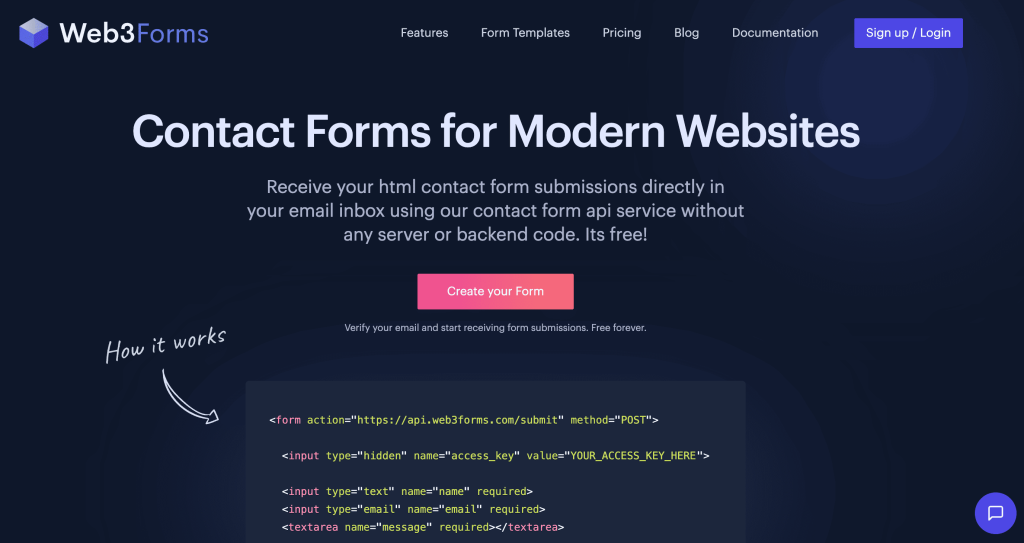
Web3Forms is a form-to-email API. You write your HTML form, point the action attribute at their API endpoint, and include a hidden input with your access key. When a visitor submits the form, Web3Forms receives the data and forwards it straight to your inbox. There’s no dashboard to log into, no backend for you to run, and submissions aren’t stored long-term on their servers.
It was built by a solo developer who was making static website templates and kept running into the same problem: HTML and CSS can’t send email on their own. He built Web3Forms to solve it for himself, and it’s grown from there into a small bootstrapped product with a paying user base.
How does the setup work?
You go to web3forms.com, enter your email, and they send you an access key. Drop that key into a hidden input field in your form, set the form action to their API endpoint, and you’re done. The first submission you send is a test to confirm it’s working.
The access key isn’t a secret. It’s designed to sit in your public HTML, acting as an alias to your email rather than a password. On the free plan, anyone could technically use your key from another domain, though in practice that rarely happens. If it’s a concern, the paid plan lets you lock submissions to trusted domains.
You can add spam protection via a honeypot field, set a custom redirect after submission, and integrate hCaptcha or reCaptcha if you need something more aggressive against bots. File uploads and autoresponders are available on the paid plan.
Who uses it?
Mostly developers. Portfolio sites, landing pages, small business sites on static hosting, that kind of thing. It’s also used by people building with React, Next.js, or Vue who want form submissions without adding a whole backend to their project. I’ve even used it on an e-commerce store before by simply just injecting the HTML onto the page.
If you’re a marketer or a non-technical user wanting a drag-and-drop form with conditional logic, analytics, and CRM integrations, Web3Forms isn’t built for that. You’d be better served by tools designed for that purpose. The best free form builders guide covers the main no-code options if that’s what you’re looking for.
How does it compare to dedicated form builders?
Most form builders give you a visual editor, templates, built-in analytics, and some kind of integrations layer. Web3Forms does none of that. You design the form entirely yourself in HTML, and Web3Forms just handles where the submissions go.
The trade-off cuts both ways. You get full control over how your form looks and behaves, with no platform branding and no constraints around field types or layout. What you don’t get is anything resembling a form management interface. If a non-technical team member needs to update the form, that’s a code change.
For context on what a more fully featured tool looks like, what Jotform is used for gives a sense of how different the use case is at the higher end of the market.
Web3Forms vs Formspree
Formspree is the closest comparison. Same concept: you build the form, they handle the submission routing. Web3Forms tends to position itself as cheaper, and the free tier is more generous than Formspree’s (custom redirects included for free, for example).
Both have the same ceiling. If you want submissions sent to a Google Sheet, a CRM, or a Slack channel, you’ll need to pipe through a webhook and connect to something like Zapier or Make. That works, but it adds another dependency and another potential failure point.
If having full ownership over your form data matters to you, open-source form builders are worth a look. You’d be self-hosting, but nothing leaves your own infrastructure.
Pricing
The free plan gives you 250 submissions per month, unlimited forms across unlimited domains, custom redirects, and basic honeypot spam protection. For a low-traffic portfolio or contact page, that’s plenty.

The paid pro plan (currently priced at $16/mo) unlocks higher submission limits, file uploads, autoresponders, longer submission storage (one year versus 30 days on free), and trusted domain restrictions. Pricing is low by SaaS standards. Compare that to something like Typeform, where the pricing scales significantly as you add features. The Typeform examples page gives a good picture of what you’d actually be paying for at that level.
A few things to watch out for
The 250 submission limit sounds comfortable until you put a form somewhere with real traffic. A lead gen form on a promoted landing page will burn through that in a day. Upgrade before you need to, not after.
Email deliverability is the other variable. Web3Forms routes submissions to your inbox, and that means they can occasionally land in spam, particularly if your email provider’s filters are aggressive. Send a few test submissions from different devices before going live.
Submissions aren’t stored permanently on their servers, which is either a privacy feature or a liability depending on your situation. If you need a record of every submission, set up a webhook to a Google Sheet or similar from the start rather than relying on your inbox alone.
Is it worth using?
For static sites with a developer behind them, yes. It does one thing well: it takes a form submission and puts it in your inbox without requiring a server. The setup is fast, the free tier is usable without jumping through hoops, and it integrates cleanly with every major frontend framework.
The limitations are real but they’re not hidden. You build the form yourself, you manage your own data, and beyond basic spam protection you’re on your own for anything more complex. Most developers who use it know that going in.
If you’re still deciding whether you need something custom at all, the Google Forms examples guide is worth a read. Sometimes a free embedded form gets the job done without any of this.
Frequently asked questions
Is Web3Forms free?
Yes, and the free plan is genuinely usable rather than a trial. You get 250 submissions per month, unlimited forms, custom redirects, and basic spam protection without entering payment details. The paid plan adds higher limits, file uploads, and autoresponders.
Does Web3Forms store my form submissions?
Temporarily. Free plan submissions are stored for 30 days, paid plan for one year, then deleted automatically. If you need a permanent record, export them or route a copy to a spreadsheet via webhook from the start.
Do you need to know how to code to use Web3Forms?
You need to be comfortable with basic HTML, or at the very least, comfortable with using AI to handle HTML. You’re writing your own form markup and editing code to add the access key and endpoint. It’s not complex, but it’s not a drag-and-drop builder either. If coding isn’t your thing, look at the form builders roundup instead.
Does Web3Forms work with React or Next.js?
Yes. The API works with any frontend framework. Their docs include specific examples for React, Next.js, and other JavaScript setups, and the integration is straightforward in all of them.
What happens when you hit the 250 submission limit?
Submissions beyond the limit won’t get delivered. You won’t get a warning mid-month, so if your form is on a busy page, it’s better to upgrade early. There’s no overage buffer on the free plan.
Is it safe to put your access key in public HTML?
Yes, by design. The key is an alias to your email address, not a secret credential. It’s built to be public. On the paid plan you can add trusted domain restrictions if you want to prevent the key being used from other sites.
What are the main alternatives to Web3Forms?
Formspree is the most direct equivalent. Formspark and FormSubmit work on similar principles. For no-code options, the form builders guide covers tools suited to non-technical users across different budgets and use cases.